
"No-Code" tools like Zapier, Make.com, or n8n are fantastic innovations. I use them personally for productivity hacks and simple notifications. They are like duct tape: perfect for a quick fix or a prototype.
But for a scaling enterprise, you cannot run your house on duct tape. You need plumbing.
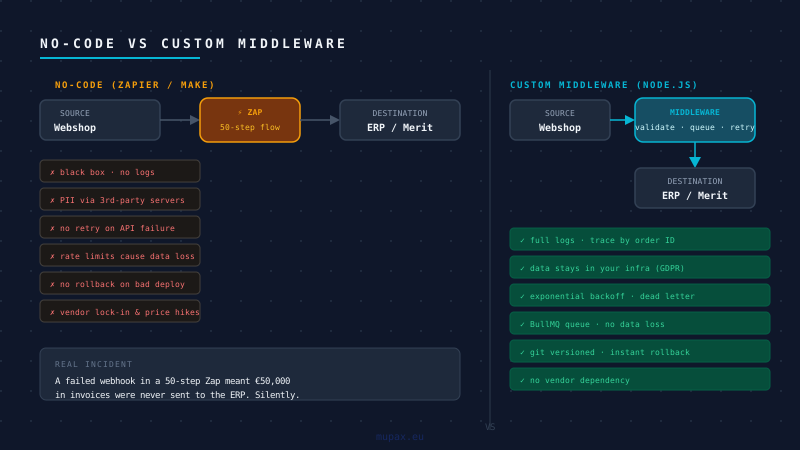
I see a worrying trend: companies running critical financial and operational logic on fragile no-code workflows. I have seen businesses where a failed webhook in a 50-step "Zap" meant €50,000 worth of invoices were never sent to the ERP.
The Difference: Automation vs. Integration vs. Logic
To understand the risk, we must clarify three different concepts that founders often confuse:
- Automation: Moving data from A to B (e.g., "Send Slack message when a form is filled").
- Integration: Connecting two systems to speak the same language.
- Business Logic: Deciding what the data means and how to process it (e.g., "If stock < 5 in Warehouse A, check Warehouse B, then update Shopify").
No-code excels at Automation. It struggles with Integration. It is high-risk for Business Logic.
The Risks of "Glue Code" at Scale
1. The Black Box Problem (Observability)
When a custom Node.js service fails, we get detailed logs, a stack trace, and a metric alert in our dashboard. We know exactly why it failed.
When a complex Zap fails, you might get an email. Or you might get nothing.
You cannot grep the logs. You cannot trace a transaction ID across three systems. You are operating in the dark. Proper middleware provides centralized logging and observability, not just "success/fail" emails.
2. Rate Limiting and Throttling
Real-world APIs have limits. If your Shopify store suddenly gets 1,000 orders in an hour, but your Enterprise Resource Planning (ERP) API only accepts 100 requests per minute, no-code tools usually struggle.
Zapier may hit execution limits, skip records, or require manual intervention.
Custom middleware handles this with Queue Management (e.g., BullMQ). It accepts all 1,000 orders instantly, puts them in a line, and feeds them to the ERP at a safe speed (Throttling). No data is lost.
3. Data Privacy & Security
Do you really want your customer's PII (Personally Identifiable Information) passing through a third-party US-based processor just to move from Database A to Database B? For GDPR compliance, every unnecessary sub-processor is a liability. Custom middleware keeps data within your controlled infrastructure.
4. Version Control & Rollbacks
If you break a Zap, there is often no "Undo" button for complex logic changes. You cannot review the code history (Git blame) to see who changed what and when. With custom code, we use Feature Flags and Atomic Deploys. If a new integration rule causes issues, we roll back to the previous version in seconds.
When Should You Use No-Code?
We are not zealots. There is a time and place for no-code tools.
| Use Case | No-Code (Zapier) | Custom Middleware |
|---|---|---|
| Marketing Automations | ✅ Excellent | ❌ Overkill |
| Prototyping / MVP | ✅ Good | ❌ Overkill |
| Financial / Invoicing | ❌ High-Risk | ✅ Required |
| High Volume Data | ❌ Expensive | ✅ Efficient |
The Hybrid Reality
It is rarely "all or nothing." In many successful architectures, no-code tools serve as excellent outer-layer automations (handling notifications or marketing tasks), while custom middleware handles the rigorous core logic. It is about choosing the right tool for the specific layer of the stack.
The Mupax Approach: Asset Ownership
For Mupax clients, we build Custom Middleware (usually Node.js/TypeScript) hosted on your infrastructure.
The Trade-Off: Maintenance vs. Control
It is important to be honest: Custom middleware is not "set and forget". It requires maintenance, updates, and monitoring. This also assumes access to developer expertise, either in-house or through a partner.
However, the trade-off is Ownership.
- No Vendor Lock-in: You are not dependent on a platform raising its prices.
- Your Roadmap: You own the logic. You can build features that no-code platforms don't support.
How We Build It
- Queue Management: If the ERP is down for maintenance, our middleware queues the order and retries automatically.
- Type Safety: We use TypeScript to ensure data structures match perfectly between systems.
- Performance: It handles 10,000 events per second for the cost of a €5-10 server.
The point is not that Zapier is bad. It has its place - we use it too, for things where a notification arriving an hour late is the worst that can happen.
But when someone calls on a Tuesday asking why their invoices are missing, "the Zap failed" is not an acceptable answer. You need something you can open, read, debug, and fix. Something that logged what it received, what it tried to do, and exactly where it went wrong.
That is what custom middleware gives you. Not magic - just visibility.
Frequently Asked Questions
What is the difference between Zapier and custom middleware?
Zapier is a managed automation platform that connects apps via a visual workflow builder - fast to set up, no code required, and hosted by a third party. Custom middleware is code your team owns and hosts, built specifically for your integration. Zapier excels at simple automations where a notification arriving an hour late is the worst that can happen. Custom middleware is required when the integration carries financial data, high volume, or business logic that needs to be audited, retried, and debugged.
When should you use custom middleware instead of Zapier or Make?
Use custom middleware when: the integration processes financial documents (invoices, payments, credit notes); volume exceeds your no-code plan's execution limits; you need to queue and throttle requests against a rate-limited API; data contains customer PII that should not pass through a third-party US processor; or failure needs to surface as a logged, traceable error rather than a missed email notification. Marketing automations and non-critical notifications are well-suited to Zapier.
Can Zapier handle high-volume e-commerce integrations reliably?
Not reliably. No-code platforms apply rate limits and execution caps that become bottlenecks at sustained order volume. A spike of 1,000 orders in an hour against an ERP API that accepts 100 requests per minute requires queuing and throttling - logic that no-code tools handle poorly or not at all. Custom middleware with a job queue (BullMQ, for example) accepts the full spike immediately, processes at the safe rate, and retries failed jobs without data loss.
What is a job queue in a custom middleware integration?
A job queue is a data structure that holds integration tasks (such as "create Merit invoice for order #1234") and processes them at a controlled rate. When a Magento webhook fires, the middleware validates the payload and enqueues a job rather than calling the ERP synchronously. A worker picks up the job, makes the API call, and retries on failure with exponential backoff. This decouples the order placement from the ERP latency and makes the integration resilient to outages.
Is Zapier GDPR-compliant for ERP integrations involving customer data?
Zapier is a US-based data processor. Using it to route order data containing customer names, addresses, and VAT numbers between an Estonian webshop and an ERP means adding Zapier as a sub-processor under GDPR. This is permissible but requires a Data Processing Agreement, adds to your sub-processor list, and depends on US-EU data transfer frameworks that have changed multiple times. Custom middleware hosted on EU infrastructure eliminates this sub-processor relationship entirely.