
Connecting the Webshop to the Back Office
Orders, stock and accounting - in sync automatically
The Problem
Manual data entry is a quiet source of errors - attention drifts, a row gets skipped, a number goes into the wrong field. By the time a mistake is found, it's often hard to say where it came from or whether it's already reached a customer invoice. The most painful moments come on Friday afternoons: a campaign is running, orders are coming in quickly, and someone has to manually update stock levels to prevent overselling. One person is doing the most critical work at the most boring part of the process - and if they're sick, everything stops.
Our Approach
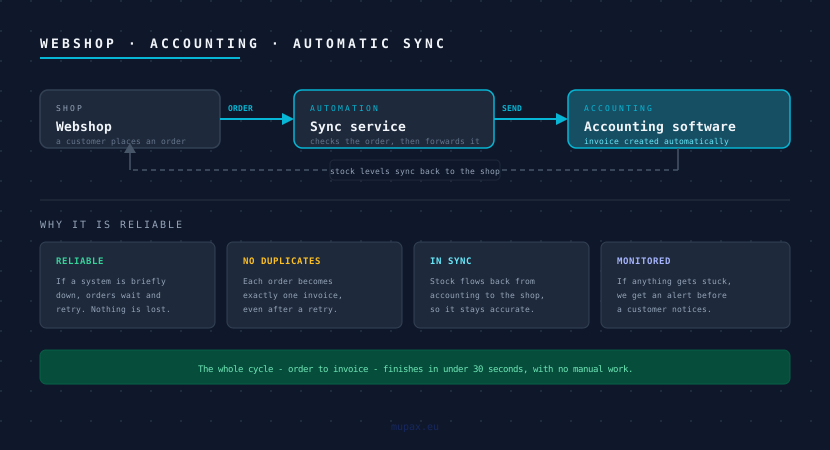
We built a small service that watches for new orders in the webshop and passes them into a processing queue. The queue matters: if the accounting system is briefly unavailable, no order is lost - it waits and retries. Each order carries a unique marker that's checked before processing, so if the same event arrives twice after a network hiccup, it's still handled only once. Stock works the other way - the accounting system is checked regularly and any changed product is pushed back to the webshop.
<SYSTEM_FLOW />
The Result
The full cycle - order, stock reservation, invoice - finishes in under 30 seconds after a purchase, with no one touching it. The Friday manual stock update is history. Month-end reconciliation that used to take half a day is gone, because invoices are created automatically with every order. The team uses that time for something more useful.
Why this matters:
- No more copying orders between systems by hand.
- Stock stays accurate - you stop selling things you don't have.
- Invoices are created with every order, so month-end is just another day.
- If a system is briefly down, messages wait and retry on their own.
- Monitoring flags anything stuck, so problems surface before customers notice.
Challenges
The biggest challenge was the accounting system's inconsistent API - some fields were optional in one version and required in another, and the error messages weren't always clear. We built a layer over it that cleans up the input and returns plain, useful errors, so the source of any problem is easy to find. The second was making sure each order becomes exactly one invoice, even when something is retried after an interruption - we kept a short record of every processed order to rule out duplicates.