
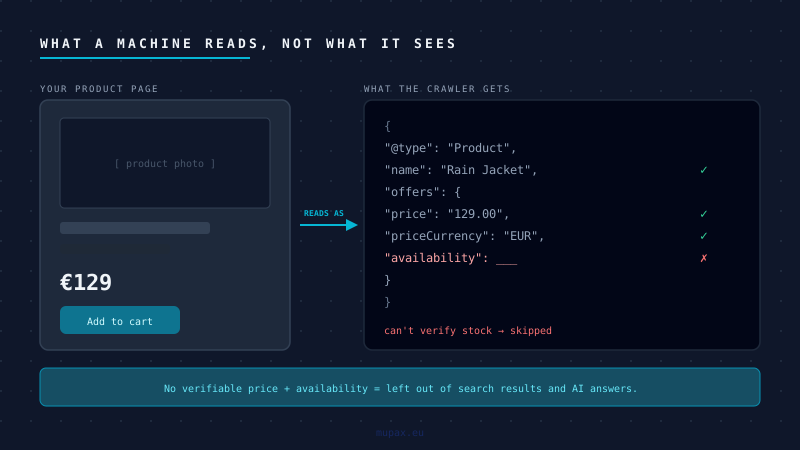
For twenty years, SEO meant helping a person find a blue link and click it. A growing share of product discovery no longer works that way.
A shopper asks an assistant for "a waterproof jacket under 150 euros, in stock." Google answers a query directly in an AI overview instead of sending the click. A comparison engine pulls your catalog into a price grid. None of those read your nicely designed product page. They read the structured data behind it - and if they cannot verify your price and availability from that data, they leave you out of the answer.
You do not need 2026 statistics to take this seriously. It is already how Google Merchant, rich results, and every serious scraper work today. The machines were reading product data long before the AI agents showed up. The agents just raise the stakes.
From links to data structures
A modern crawler does not read your page the way a human does. It looks for a contract: schema.org/Product markup, usually as JSON-LD, that states without ambiguity the name, the price, the currency, and the availability.
If that contract is present and valid, your product is eligible to appear in rich results, shopping surfaces, and AI answers. If it is missing, malformed, or contradicts what is on the page, the safe move for the machine is to skip you. Showing a wrong price is worse for them than showing nothing - so they default to nothing.
So the question is not whether your site looks good. It is whether a machine can state, with confidence, that this exact product costs this exact amount and is in stock right now.
Where default Magento drops the ball
Magento can produce good structured data. Out of the box - and especially on the default Luma theme - it frequently does not. The usual failures:
Configurable products with no real offer. This is the big one. A configurable product with sizes and colours often emits a parent with a "from" price or a price range, and no availability per variant. A machine reading "from 49 EUR" cannot tell what a customer actually pays, or which variants are in stock. You want each purchasable variant carrying its own price and availability, or an AggregateOffer with a correct low and high and an in-stock count.
Availability that does not match reality. Offer.availability should be a real schema.org value - InStock, OutOfStock, BackOrder - driven by your actual inventory, per variant. Default setups often hardcode InStock or leave it out entirely. The first time a machine catches you claiming in stock on a sold-out item, it trusts your whole feed less.
Missing identifiers. No gtin, mpn, or brand means shopping and AI surfaces cannot match your product to the same product elsewhere. Unmatched means uncompared, and uncompared means skipped.
Broken breadcrumbs and duplicate blocks. A wrong BreadcrumbList depth, or two conflicting Product blocks on one page - the theme and an SEO extension both injecting markup - make validators throw errors. Errors make machines distrust the whole page.
Three checks you can run today
You do not need a developer to find out whether you have a problem. You need ten minutes.
-
Open a product page, view source, search for
application/ld+json. Is there exactly oneProductblock? Does its offer haveprice,priceCurrency, andavailabilityfilled with real values - not blank, not "0", not a range when the product has a single price? -
Test a configurable product specifically. Pick one with sizes or colours and run its URL through Google's Rich Results Test. Does it report a valid product with an offer reflecting a price a customer can actually pay? Or a vague range with no per-variant availability?
-
Validate, do not eyeball. Run a simple product, a configurable product, and a category page through the Rich Results Test or the schema.org validator. The errors and warnings there are exactly what a crawler sees. Zero errors is the bar.
If those three come back clean across your product types, you are ahead of most Magento stores. If they do not, that is visibility you are already paying to replace with ad spend.
The fix is boring, which is why it works
There is no AI magic here. The fix is correct, per-variant structured data, driven by real inventory, validated on every template - simple products, configurable products, bundles, categories. On Hyvä it is cleaner to control than on Luma. Get it right once at the template level and every product inherits it.
The stores that win the next few years of search will not be the ones with the cleverest copy. They will be the ones a machine can read without guessing.
We build and audit Magento structured data so both Google and the new wave of AI shoppers can read your catalog. If you are not sure what a machine sees when it hits your store, talk to us.
Frequently Asked Questions
What is Product schema markup and why does Magento need it?
Product schema markup is schema.org/Product structured data - typically JSON-LD in the page <head> - that declares the product name, price, currency, and availability in a machine-readable format. Magento requires it because Google, AI shopping agents, and comparison engines use it to verify product details. Pages without valid schema are skipped in favour of pages a machine can read with confidence.
Why is my Magento store missing from Google Shopping results?
The most common cause is invalid or missing Offer data in your Product schema. Google's Merchant crawlers require explicit price, priceCurrency, and availability values (InStock, OutOfStock, or BackOrder). On configurable products, a vague "from" price range with no per-variant availability means the machine cannot confirm what a customer actually pays - so it omits the product rather than risk showing a wrong price.
How do I validate Magento Product schema?
Run your product URLs through Google's Rich Results Test. Check three types: a simple product, a configurable product, and a category page. The test renders JavaScript and shows exactly the errors a Googlebot would see. Zero errors and a valid Product result with an Offer containing a real price is the bar - not just "something parsed."
What is the AggregateOffer type and when should Magento use it?
AggregateOffer describes a product sold by multiple sellers or available in a price range across variants. Magento configurable products should use it when the lowest and highest variant prices differ. It must include lowPrice, highPrice, priceCurrency, and offerCount. Using a single Offer with a range string ("from €49") is invalid schema and will cause the product to fail validation.
How do AI shopping agents read Magento product data?
AI shopping agents - including Google's AI Overviews and emerging agentic comparison tools - parse schema.org/Product JSON-LD to verify price and availability without rendering the full page. If the structured data is present and valid, the product is eligible for inclusion in AI answers and comparison surfaces. If the data is missing, contradictory, or uses incorrect schema types, the agent skips the product to avoid surfacing incorrect information to users.