
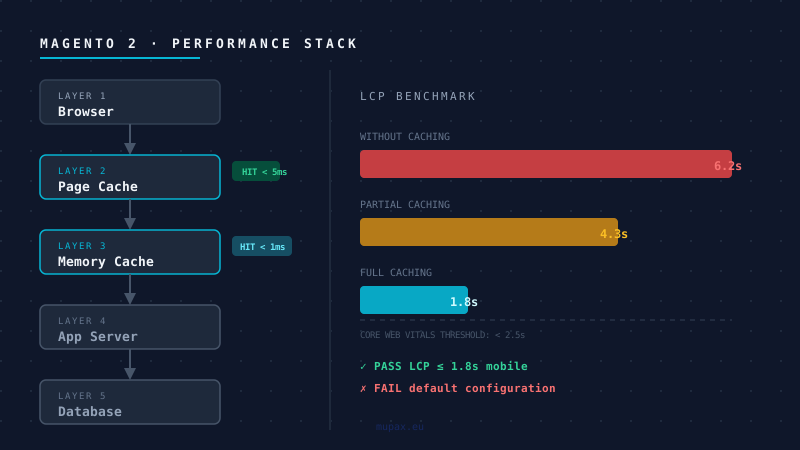
Your Magento 2 store passes every internal test. Staging looks fine. Then you go to Google PageSpeed Insights and see a mobile LCP of 6.2 seconds.
This is not a mystery. After auditing dozens of Magento installations, the same four bottlenecks appear in nearly every slow store. They are not caused by bad luck - they are caused by default configuration that was never tuned for production traffic.
Bottleneck 1: Full Page Cache Is Disabled or Poorly Warmed
Magento ships with a built-in Full Page Cache (FPC). On a default installation it uses the filesystem as a backend. This is fine for a development environment. It is not acceptable for a store receiving real traffic.
The problem compounds when the cache is not warmed. A cold cache means the first visitor to any given URL triggers a full PHP stack request: Bootstrap → App → Router → Controller → Rendering → Layout XML compilation. On a moderately complex store, this takes 3-8 seconds.
Replace the filesystem FPC backend with Varnish Cache. Varnish serves cached pages directly from RAM in under 5ms, bypassing PHP entirely. Configure it with the Magento-provided VCL and tune the TTL for category and product pages aggressively - 24 hours is a reasonable starting point.
Set up a cron-based crawler (e.g., magerun2 cache:warm) to pre-populate the cache after every deployment. A warm cache means your first real visitor never sees a cold response.
Bottleneck 2: MySQL Is Doing the Work Redis Should Be Doing
By default, Magento stores sessions and cache data in MySQL. This creates two problems: it adds read/write load to your primary database, and MySQL is fundamentally the wrong data structure for high-frequency key-value lookups.
The result is a database that looks idle on aggregate metrics but is saturated with tiny, fast queries that collectively consume 40-60% of query time.
Move sessions to Redis instance #1 and the Magento cache backend to Redis instance #2. Two separate instances prevent session eviction from competing with cache eviction. Configure both in env.php:
'session' => ['save' => 'redis', 'redis' => ['host' => '127.0.0.1', 'port' => '6380']],
'cache' => ['frontend' => ['default' => ['backend' => 'Cm_Cache_Backend_Redis', ...]]]
After this change, MySQL query counts typically drop 30-50% and average response time improves by a proportional amount.
Bottleneck 3: N+1 Queries in Custom Modules
This is where most audits stop looking, and where most problems actually live.
Magento's collection model makes it easy to write loops that trigger a database query per iteration. A single call to $product->load($id) inside a foreach on a 200-item category page fires 200 individual SELECT statements. Each one is fast in isolation - 2ms - but 200 × 2ms = 400ms, and that is before the page has done anything else.
Custom modules are particularly prone to this pattern because developers test with small datasets. Ten products look fine. Five hundred products cause a timeout.
Enable the Magento query log in development mode and watch for patterns of identical queries executing in loops:
<config>
    <profiler>1</profiler>
</config>
Rewrite collection lookups to use addAttributeToSelect('*') once and iterate over the result, rather than calling load() on individual models. For cross-entity lookups, use resource model joins rather than separate queries.
For production diagnosis, tools like New Relic, Blackfire, or even SHOW PROCESSLIST during a slow request will surface the offenders quickly.
Bottleneck 4: JavaScript Is Blocking First Paint
Magento 2 ships with RequireJS, jQuery, and a non-trivial amount of Knockout.js. The default theme loads a significant JavaScript payload synchronously, which blocks HTML rendering until the browser has parsed and executed it.
On mobile networks this manifests as a blank page for 2-4 seconds before anything appears - even if your server responds quickly. This directly tanks your LCP score regardless of how fast your backend is.
The single most effective intervention is migrating the frontend to Hyvä Themes. Hyvä replaces RequireJS and Knockout with Alpine.js and Tailwind CSS, reducing JavaScript payload by 95% and eliminating the blocking parse step entirely. Stores typically see LCP drop from 4-6s to under 2s after migration.
If a full theme migration is not feasible, apply these partial fixes:
- Move all non-critical scripts to
deferorasync - Merge and minify JS bundles in production mode (
bin/magento setup:static-content:deploy) - Lazy-load images below the fold using the native
loading="lazy"attribute in the product image template
The Diagnostic Order That Saves Time
Start from the back, not the front. Developers instinctively open Chrome DevTools and look at network waterfalls. This is the last thing to fix, not the first.
- Server response time (TTFB) - if this is over 500ms, fix the cache and Redis layers first
- Database query count - enable query logging for one request; anything over 100 queries is a symptom
- PHP profiling - use Blackfire to find which method calls are expensive, not just which queries
- Frontend payload - only optimize the browser-side after the server-side is clean
A Magento store with Varnish, Redis, clean collections, and a lightweight frontend can consistently achieve LCP under 1.8s on mobile networks. None of these changes require new hardware. They require the right configuration applied in the right order.
Mupax specialises in Magento 2 performance engineering. If your store fails Core Web Vitals or your team suspects N+1 query problems, reach out for a technical audit.
Frequently Asked Questions
Why is my Magento 2 store slow despite good hosting?
The most common cause is that the Full Page Cache is using the filesystem backend instead of Varnish, or Redis has not been configured for sessions and cache. These are default configuration choices, not hosting limitations. A store with a cold filesystem cache takes 3-8 seconds to respond to the first request on any URL - regardless of server spec.
What is a good LCP score for a Magento 2 store?
Google's Core Web Vitals threshold for a passing LCP is 2.5 seconds. A well-configured Magento 2 store - Varnish, Redis, clean collections, and a lightweight frontend - can consistently achieve LCP under 1.8 seconds on mobile. Stores on the default Luma theme with no cache optimisation typically score 5-8 seconds on mobile networks.
Does the Hyvä theme actually improve Magento 2 performance?
Yes, measurably. Hyvä replaces RequireJS and Knockout.js with Alpine.js and Tailwind CSS, reducing JavaScript payload by approximately 95% compared to the default Luma theme. The blocking parse step that causes 2-4 second blank screens on mobile is eliminated. Most stores migrating from Luma to Hyvä see LCP drop by 3-5 seconds.
How do I find N+1 query problems in Magento 2?
Enable the Magento query log in developer mode and look for identical SELECT statements repeating in a loop during a single page request. Any module calling $product->load($id) inside a foreach is a candidate. In production, New Relic or Blackfire surface the top query contributors without debug mode. A 200-item category page with N+1 queries can fire 200 individual database calls adding 400ms before the page does anything else.
Should I use Varnish or the built-in Magento Full Page Cache?
Use Varnish. The built-in FPC with a filesystem backend is suitable for development only. Varnish serves cached pages directly from RAM in under 5ms, bypassing PHP entirely. Configure it with the Magento-provided VCL file - it handles cache invalidation automatically when you save a product or CMS page. The performance difference on a live store is not marginal; it is the difference between a 3-second response and a 5ms one.